Delete Your Trader Account
App: TraderBack · Developer: Nikola Srdoc · Last updated: June 2026
This page explains how to request deletion of your TraderBack account and the data associated with it. You can delete your account directly inside the app, or by contacting us if you no longer have access.
Option 1: Delete in the app (fastest)
Open the TraderBack app and make sure you are signed in.
Go to your Profile, then open Settings.
Tap Delete Account.
Select a reason (optional feedback can be added), then confirm.
Your account is deleted immediately and you are signed out.
Option 2: Request deletion by email
If you can't access the app, email traderapp.team@gmail.com from the email address associated with your account, with the subject "TraderBack Account Deletion Request". We verify ownership of the address and complete the deletion within 30 days.
What data is deleted
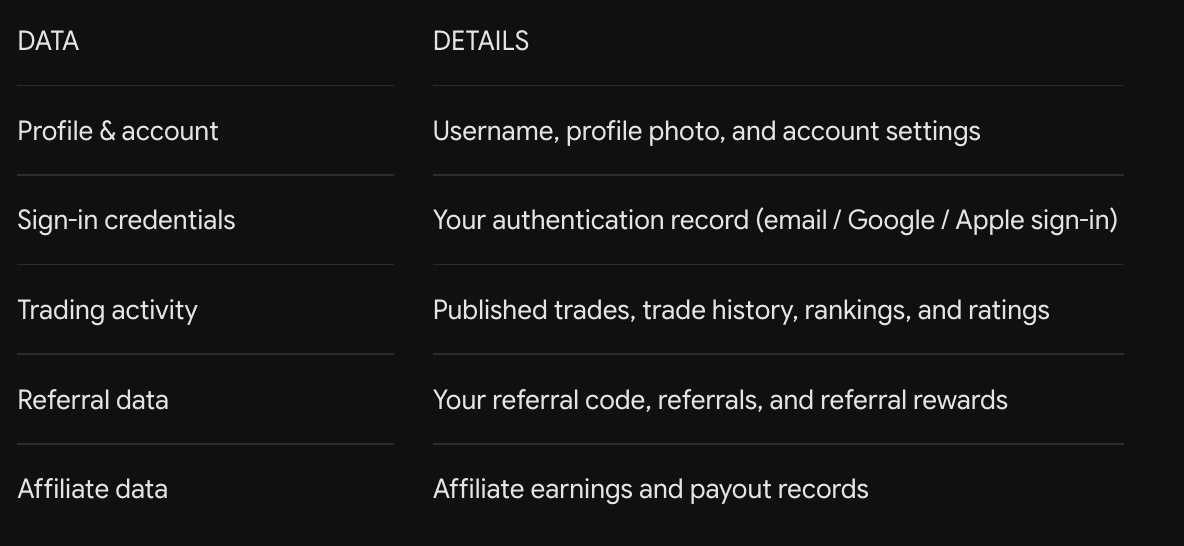
When your account is deleted, the following data is permanently removed:
What data is kept, and for how long
For legal compliance, fraud prevention, and abuse-prevention purposes, we retain a minimal deletion record containing your user ID, email address, username, and the deletion reason you provided.
This record is kept for up to 12 months, after which it is also removed.
Subscription and purchase receipts processed by the app stores (Google Play / Apple) and our payments provider (Adapty) are retained by those services according to their own policies and applicable tax/accounting law. We do not store your payment card details.ž
Questions
For any questions about account deletion or your data, contact traderapp.team@gmail.com.